
About
Builderii, in facts.
Everything Builderii is and does on one page, for anyone deciding whether to use it, writing about it, or answering a question about it.
Works in your browser · No card · Free while it’s new
In short
Builderii is an infinite canvas in the browser for flowcharts, mind maps, wireframes and clickable prototypes, with an AI that draws and edits diagrams and app screens from a prompt, and live collaboration for the team. It’s for founders, product managers, designers, engineers and facilitators who want to go from an idea to a tested prototype in one place. It’s free while it’s new, with every feature.
- What it is
- An AI canvas for flowcharts, mind maps, wireframes and clickable prototypes
- Made for
- Founders, PMs, designers, engineers, facilitators and students
- Runs in
- Any modern browser; nothing to install
- Price
- Free while it’s new, with every feature and 200 AI jobs a month
- AI
- Built in, as jobs with strict schemas; prompts and boards never logged
- AI draws
- App screens, flowcharts, mind maps, sequence diagrams, sitemaps, brainstorms, roadmaps, database diagrams, Mermaid
- Wireframes
- 46 components; low-fi, high-fi and Rendered final designs
- Prototypes
- Links, transitions, a player, test links with tap heatmaps
- Import
- Excalidraw, draw.io, Mermaid, CSV, SQL, Prisma, screenshots
- Export
- PNG, SVG, PDF, PowerPoint, draw.io, Mermaid, SQL, JSON
- AI assistants
- MCP server with 37 tools; plugins for Claude and ChatGPT
- Addresses
- www.builderii.com (site), app.builderii.com (app)
What Builderii is
Builderii is one infinite canvas to build anything from scratch: flowcharts, mind maps, app and website wireframes, clickable prototypes, workshops and docs. It’s keyboard-fast like Whimsical, has screens and Play like Figma, and has an AI that builds alongside you. Its positioning: describe it, sketch it or drag it, then click Play.
What you can make
Flowcharts, mind maps, app and website wireframes in low or high fidelity, Rendered final designs, clickable prototypes, sequence diagrams, sitemaps, database (ER) diagrams, roadmaps with real dates, org charts, architecture diagrams, workshops with sticky notes and voting, and rich-text docs, all on boards with as many pages as you need. There are 18 built-in templates, and any board can be saved as your own.
How the AI works
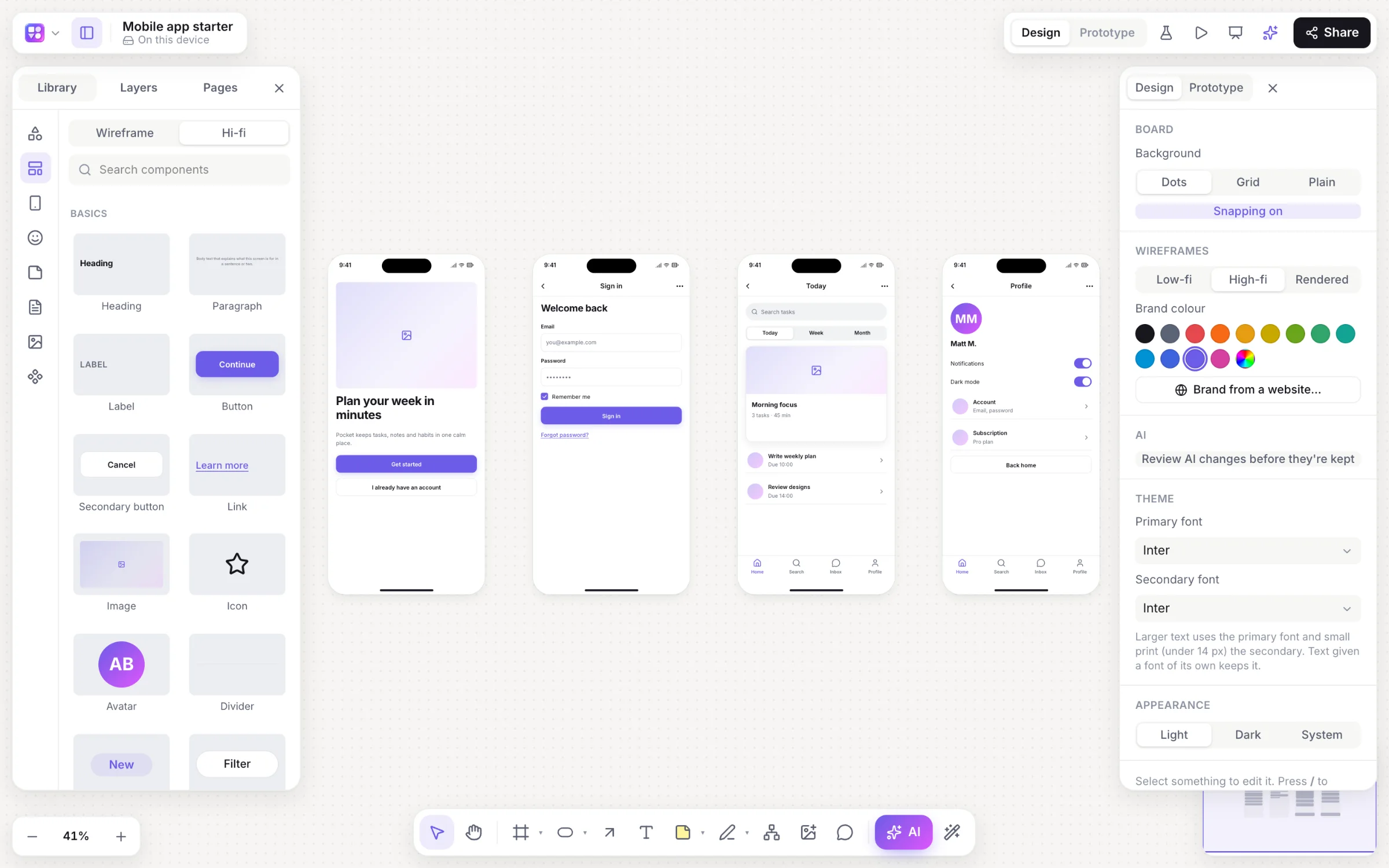
Press / on a board and pick a kind: app screens, flowchart, mind map, sequence diagram, sitemap, brainstorm, roadmap, database or Mermaid. The AI decides what goes on the board; Builderii’s own layout engines decide where, so results are tidy and editable. Select part of a diagram and ask for a change, and it changes in place as one undo step, optionally waiting for your review. The AI also turns screenshots and sketches into wireframes, turns a screen into HTML and React code, writes specs with user stories, groups and summarises sticky notes, and expands ideas. Each person gets 200 AI jobs a month while Builderii is new.
Wireframes, Rendered and prototypes
The wireframe kit has 46 components in device frames for iPhone, Android, iPad, web, desktop and watch. ⇧W switches a board between low fidelity and high fidelity in your brand, which Builderii can read from your website’s address. Rendered redraws screens as finished designs with real photos, styled after similar real apps (with a Mobbin account) or Builderii’s own earlier renders, and Apply turns a render into editable layers. Link any element to a screen, press ⌘↵ to play, and share a test link: testers need no account, and you get tap heatmaps, time per screen and drop-off, kept 180 days.
Working together
Everyone on a board sees live cursors and edits, can follow someone or spotlight themselves, chat at their cursor and react, and leave comments with @mentions that send a notification and an email. Boards are shared by email invite, team or link, as editor, commenter or viewer; guests on a share link can watch without an account. Teams have shared boards and projects, undo takes back only your own changes, and version history keeps autosaves and named versions.
Claude, ChatGPT and MCP
Builderii’s MCP server at https://app.builderii.com/mcp gives AI assistants 37 tools that act with your access: generate any diagram from a prompt or a screenshot, read and search boards, change diagrams by name, add pages and comments. Plugins for Claude (with six skills) and ChatGPT add it in a few clicks. Apps sign in with OAuth 2.1 and a consent screen; agents that can’t sign in use a personal access token you can revoke. See Claude and ChatGPT.
Import and export
Import Excalidraw and draw.io files (with their shapes, text, arrows and groups), paste Mermaid for native shapes, paste spreadsheet cells for a table or an org chart, and paste SQL or Prisma for a database diagram. Export PNG, SVG, PDF with a page per frame, PowerPoint with speaker notes, draw.io, Mermaid, SQL and a Builderii file. Embed a live board on any website with an iframe.
Pricing
Builderii is free while it’s new, with every feature on and 200 AI jobs a month per person. Paid plans are planned and will publish their AI allowances; viewers and commenters will always be free.
Privacy and security
Boards are visible only to the people they’re shared with, at the role given; link access is off until it’s turned on, and roles are enforced on the server. Prompts and boards are never logged by the AI. Connected apps act with your access only and can be disconnected, and tokens revoked, at any time.
How it compares
Builderii overlaps with Figma, FigJam, Whimsical, Miro, Lucidchart, Excalidraw, draw.io, Balsamiq, Uizard, Visily, tldraw, Eraser, Mural and Relume. It’s the better pick for going from an idea to a tested prototype on one board with AI; Figma is better for final, pixel-perfect UI and design systems, and dedicated tools are better for formal notations, self-hosting or enterprise facilitation. See every comparison.
Compare
Builderii next to the tools you know.
Use cases
What people make with it.
Questions
Good questions.
What is Builderii?
An infinite canvas in the browser for flowcharts, mind maps, wireframes and clickable prototypes, with an AI that draws and edits diagrams and app screens, and live collaboration. It’s free while it’s new.
Is Builderii free?
Yes. Builderii is free while it’s new, with every feature on and 200 AI jobs a month per person. Viewers and commenters will always be free, and paid plans will publish their AI allowances.
Which AI does Builderii use?
Every AI action runs as a job with strict schemas: the AI decides what goes on the board, and Builderii’s own layout engines decide where, so diagrams come out tidy and stay editable. Prompts and boards are never logged.
Where do I sign up?
At app.builderii.com. Builderii runs in any modern browser, with nothing to install.
Does it work on phones?
Boards open on phones for looking: pan, zoom, read comments and play prototypes. Making and editing boards is for a computer or a tablet.
Is there an llms.txt?
Yes: llms.txt summarises Builderii for AI assistants, and llms-full.txt has every page of this site as text.

What do you want to build?
Start with a prompt, a template or a blank board. It’s free.