
Online drawing board
An online drawing board you can draw on together.
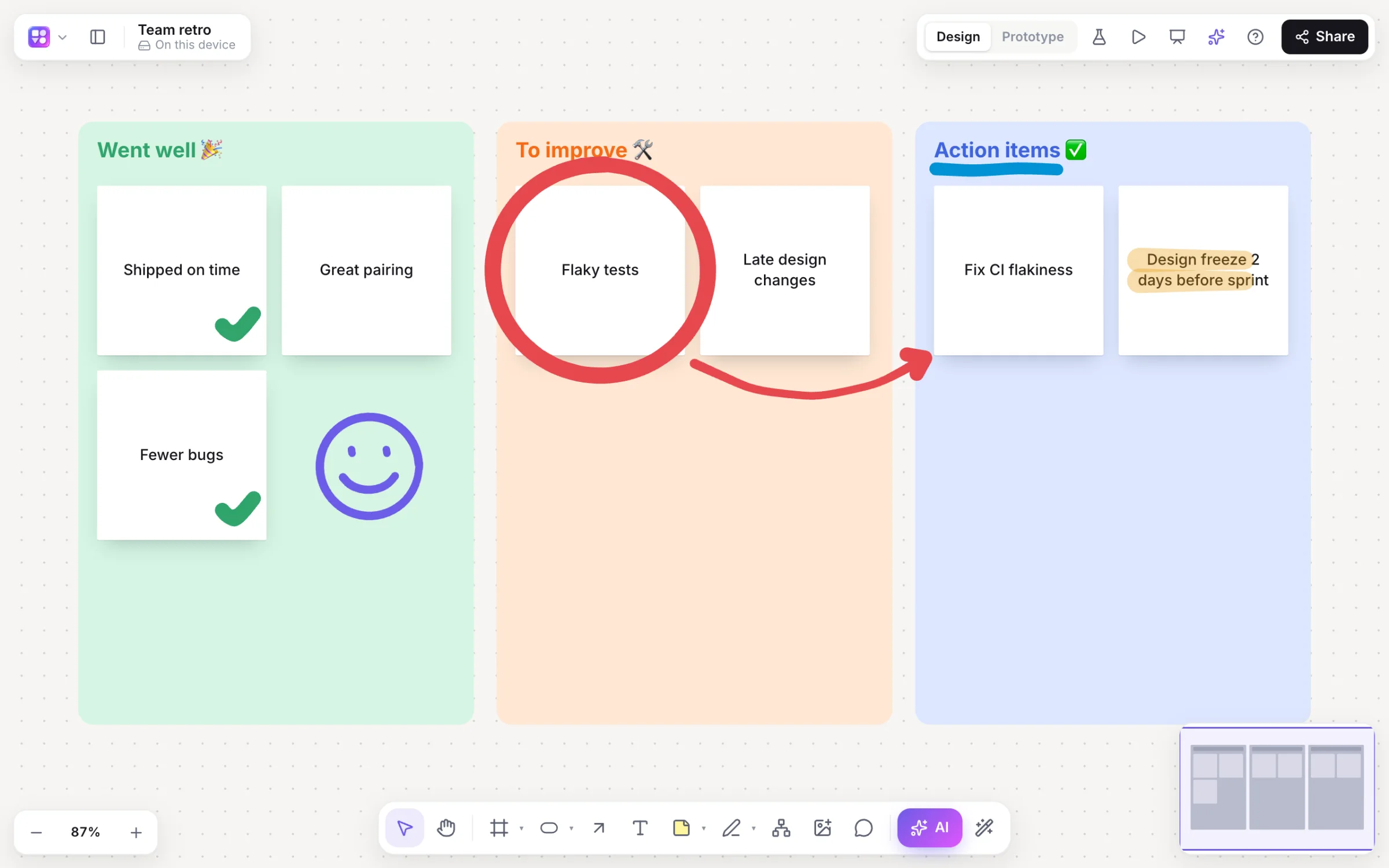
Sometimes the fastest way to explain something is to draw it. Open a board, press P and draw: circle the idea that matters, sketch the screen you mean, underline the action item, while everyone else on the board sees your strokes arrive.
Works in your browser · No card · Free to start
In short
Builderii is an online drawing board, free to start, for drawing together in the browser. Pick the marker (P), highlighter or eraser, choose from seven marker colours, six highlighter colours and four widths (on a tablet, strokes follow your stylus’s pressure), and draw over sticky notes, shapes, images and diagrams on an infinite canvas. Every marker colour stands out clearly from the board, in light or dark mode, and on a phone a Whiteboard board keeps it simple: just the drawing tools, in a bar at the bottom. Everyone you invite draws on the same board live, and anyone with the share link can watch without an account.
- Tools
- Marker, highlighter, eraser and a laser pointer
- Colours
- Nine, white included, in four widths
- Together
- Live cursors and strokes; viewers watch from a link
- Account
- A free account to draw (Google or email); none to watch
What you get
A drawing board that does more than draw.
Smooth strokes
Strokes are smoothed as you draw, and follow a stylus’s pressure on a tablet.
Highlighter
Mark up text, notes and screenshots without covering them.
Eraser and undo
E erases strokes; ⌘Z takes back only your own changes on a shared board.
Laser pointer
K leaves a fading trail on your screen: handy while you share it in a call.
Draw on anything
Drop in an image or a screenshot and draw over it, or around sticky notes and diagrams.
A blackboard look
Switch the board to dark mode and draw in white or colour, like chalk on a board.
Sketch to wireframe
Sketch a screen with the marker, select it and choose Sketch → wireframe for real components.
Save and share
Boards save as you go; export PNG, SVG or PDF, or share a link.
How it works
Start drawing in seconds.
Open a board
A blank board, or a template to draw on, such as a retrospective or a mind map.
Pick the marker
Press P (or ⇧P for the highlighter), then a colour and a width from the dock.
Draw
With a mouse, a trackpad or a stylus; E switches to the eraser.
Draw together
Invite people to edit, or share a link so anyone can watch live.
Questions
Good questions.
Is this online drawing board free?
Yes, to start. Builderii’s Free plan has every feature and 200 AI jobs a month per person, for up to 2 boards with up to 50 components on each. Pro takes those limits off for $10 a month billed yearly, or $12 month to month.
Do I need an account to draw?
To draw and edit, a free account, with Google or an email address. To watch, none: anyone with a board’s share link can view it and see edits live, as a named guest with their own cursor.
Can I draw with a stylus or an Apple Pencil?
Yes, on a tablet in the browser: the marker follows your stylus’s pressure, so strokes get thicker as you press harder. With a mouse or trackpad, strokes are smoothed for you.
Does it work on my phone?
Yes, everything works on a phone: make any kind of board, add notes, shapes, diagrams and screens, draw, edit, style, use the AI, share and export. Every menu opens as a sheet from the bottom, a long press opens the menu for what you touch, and two fingers pinch to zoom. A Whiteboard board keeps just the drawing tools, for sketching with a finger.
Is there a blackboard or chalkboard mode?
Switch the board to dark mode from the main menu and draw with the white marker or a colour: it reads like chalk on a blackboard.
Is it a painting app?
No. There are no brushes or layers for artwork: it’s a whiteboard for sketches, diagrams, teaching and meetings, with sticky notes, shapes and AI alongside the marker.
Keep reading
More ways to use Builderii.
What do you want to build?
Start with a prompt, a template or a blank board. It’s free to start.