
Roadmap maker
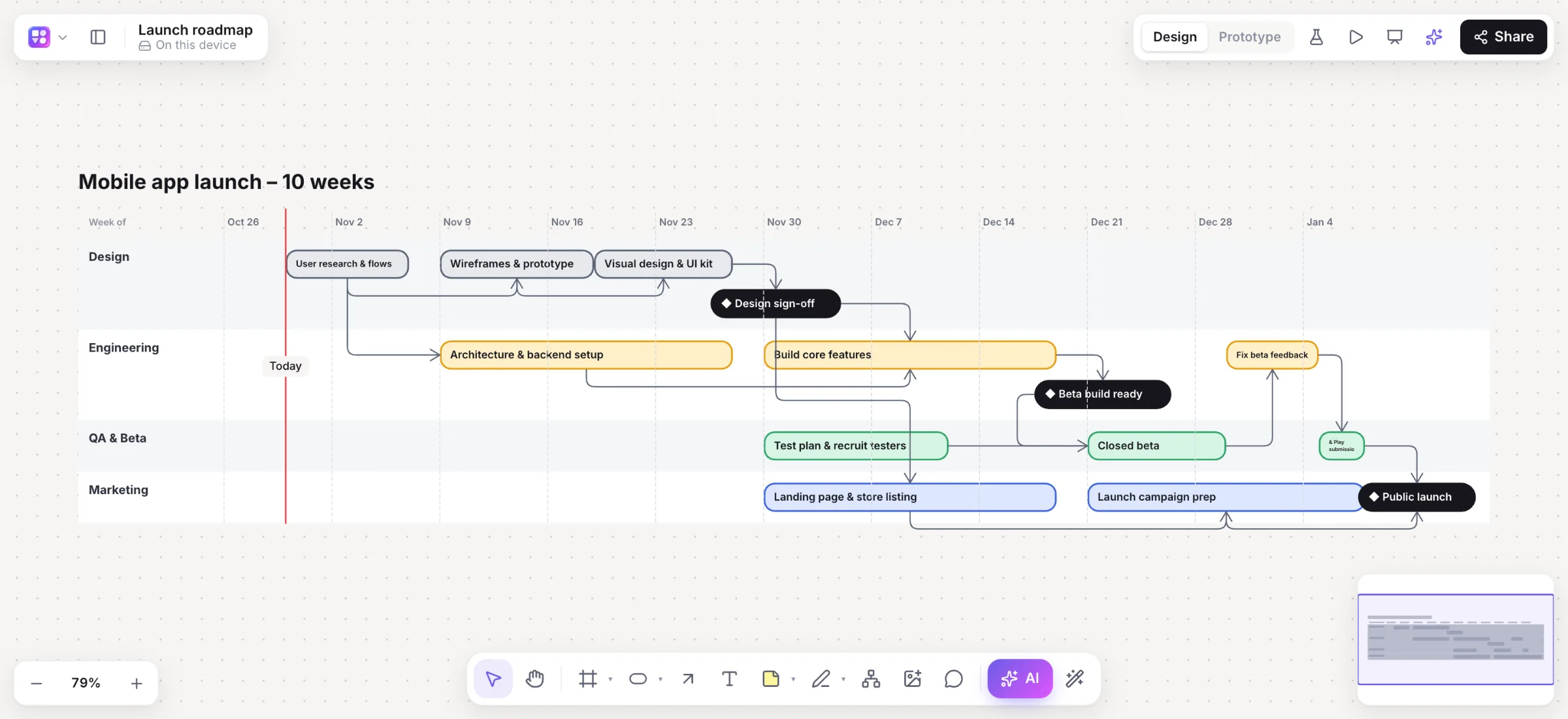
A roadmap maker with real dates, drawn by AI.
Roadmaps on whiteboards are pictures of a plan; roadmaps in spreadsheets are hard to read. Builderii’s roadmaps have real dates you can drag, and live on the same board as the product they describe.
Works in your browser · No card · Free to start
In short
Builderii is a roadmap maker and timeline generator with a free plan. Describe a plan, such as “a six-month launch with design, build, beta and marketing”, and the AI draws lanes, tasks and milestones with real dates on a week, month or quarter axis, with dependency arrows and a Today line. Drag a bar along the axis or into another lane to reschedule it, or ask for changes like “push the beta two weeks”.
- Input
- A description of the plan, or changes in plain words
- Output
- Lanes, dated bars, milestones, dependencies and a Today line
- Axis
- Weeks, months or quarters, picked from the plan’s span
- Price
- Free plan with every feature, for 2 boards; Pro, unlimited, from $10 a month
What you get
Roadmaps that stay current.
Lanes and dated bars
Tasks on a real date axis, grouped in lanes by team or theme.
Milestones
Launches and deadlines marked on the timeline.
Dependencies
Arrows from a task to the tasks that wait for it.
A Today line
See at a glance what’s done, what’s now and what’s next.
Changed by asking
Reschedule, add phases or split lanes in plain words.
Present and share
Slides with speaker notes, PowerPoint and PDF export, or a link.
How it works
From a plan to a timeline.
Press /
Pick Roadmap in the AI bar.
Describe the plan
“A Q1 plan for a mobile app: research, design, build, beta and launch.”
Adjust it
Drag bars to reschedule them, or move them into another lane.
Change it by asking
“Push the beta two weeks and add a QA phase.” It’s redrawn in place.
Questions
Good questions.
Is this roadmap maker free?
Yes, to start. Builderii’s Free plan has every feature and 200 AI jobs a month per person, for up to 2 boards with up to 50 components on each. Pro takes those limits off for $10 a month billed yearly, or $12 month to month.
Can I make a timeline, not just a product roadmap?
Yes. Any plan with dates works: a launch, a hiring plan, a course schedule. The axis switches between weeks, months and quarters to fit the span.
Can I edit the dates by hand?
Yes. Drag a bar along the axis to reschedule it, or into another lane to move it.
Can I export my roadmap?
Yes: PNG, SVG, PDF or PowerPoint, or share the live board with your team.
Keep reading
More ways to use Builderii.

What do you want to build?
Start with a prompt, a template or a blank board. It’s free to start.