
Guide
What is a wireframe? Low vs high fidelity, explained.
Wireframes are the blueprints of digital products. Here’s what goes in one, how low-fidelity and high-fidelity wireframes differ, what good examples look like, and how to make your own.
Works in your browser · No card · Free to start
In short
A wireframe is a simple, schematic drawing of a screen or web page that shows its structure (what goes where, and in what order) without the final colours, fonts or images. Low-fidelity wireframes are rough grey boxes and labels that are quick to change; high-fidelity wireframes look close to the real product, with real content, spacing and brand colours. Teams wireframe first to agree on layout and flow before visual design and code.
- Purpose
- Agree on layout, content and flow before visual design
- Low fidelity
- Grey boxes, labels and placeholders; minutes to change
- High fidelity
- Real content, spacing, brand colours and type
- Common kinds
- Website, mobile app, dashboard and landing page wireframes
At a glance
Low and high fidelity, side by side.
| Low-fidelity wireframe | High-fidelity wireframe | |
|---|---|---|
| Looks like | Grey boxes, simple shapes, plain labels | Close to the real product: colour, type, spacing |
| Content | Placeholders and short labels | Real copy and data, sometimes real images |
| Time to make | Minutes | Hours |
| Best for | Exploring layouts and flows | Sign-off, handoff and realistic tests |
| Feedback you get | Structure, order and flow | Visual details, wording and polish |
| In Builderii | The default look | One switch away, in your brand |
What is a wireframe?
A wireframe is a skeleton of a screen: boxes for images, lines for text, and simple shapes for buttons, menus, cards and forms, arranged the way the real page will be. It shows structure and priority (what’s on the page, what matters most, where people go next) and leaves the visual design for later.
Wireframes are made for websites, mobile apps, dashboards and anything else with a screen. A set of wireframes linked together shows a whole flow, such as sign-up or checkout.
What a wireframe includes
Navigation, the page heading, the main call to action, the key content blocks in order, forms and their fields, and the important states: empty, loading and error. Real labels beat lorem ipsum, because they show whether things fit and make sense.
Low-fidelity vs high-fidelity wireframes
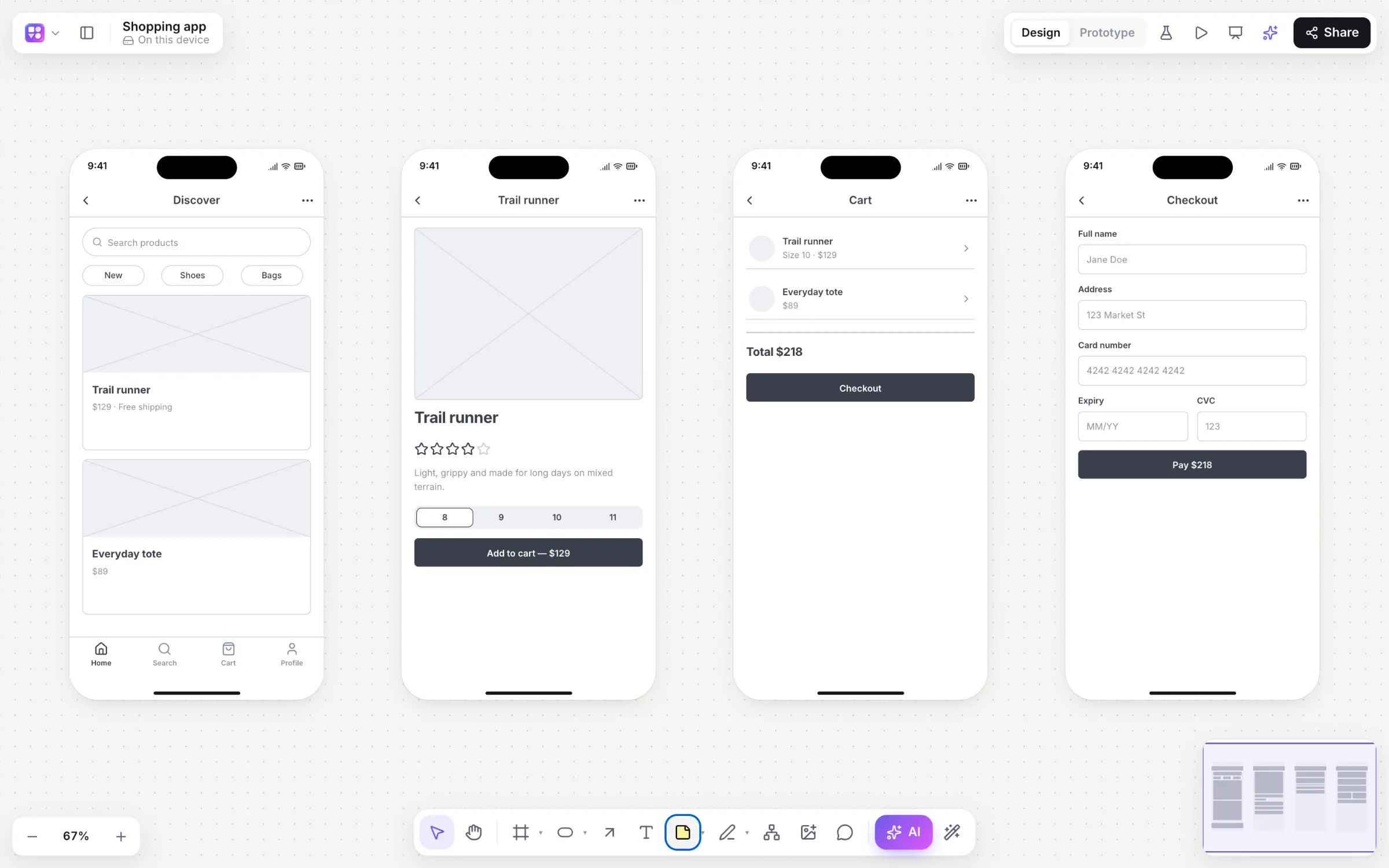
Low-fidelity wireframes are deliberately rough: grey boxes, simple shapes and plain labels, sometimes hand-drawn. They’re fast, cheap to change, and keep feedback on structure and flow instead of colours.
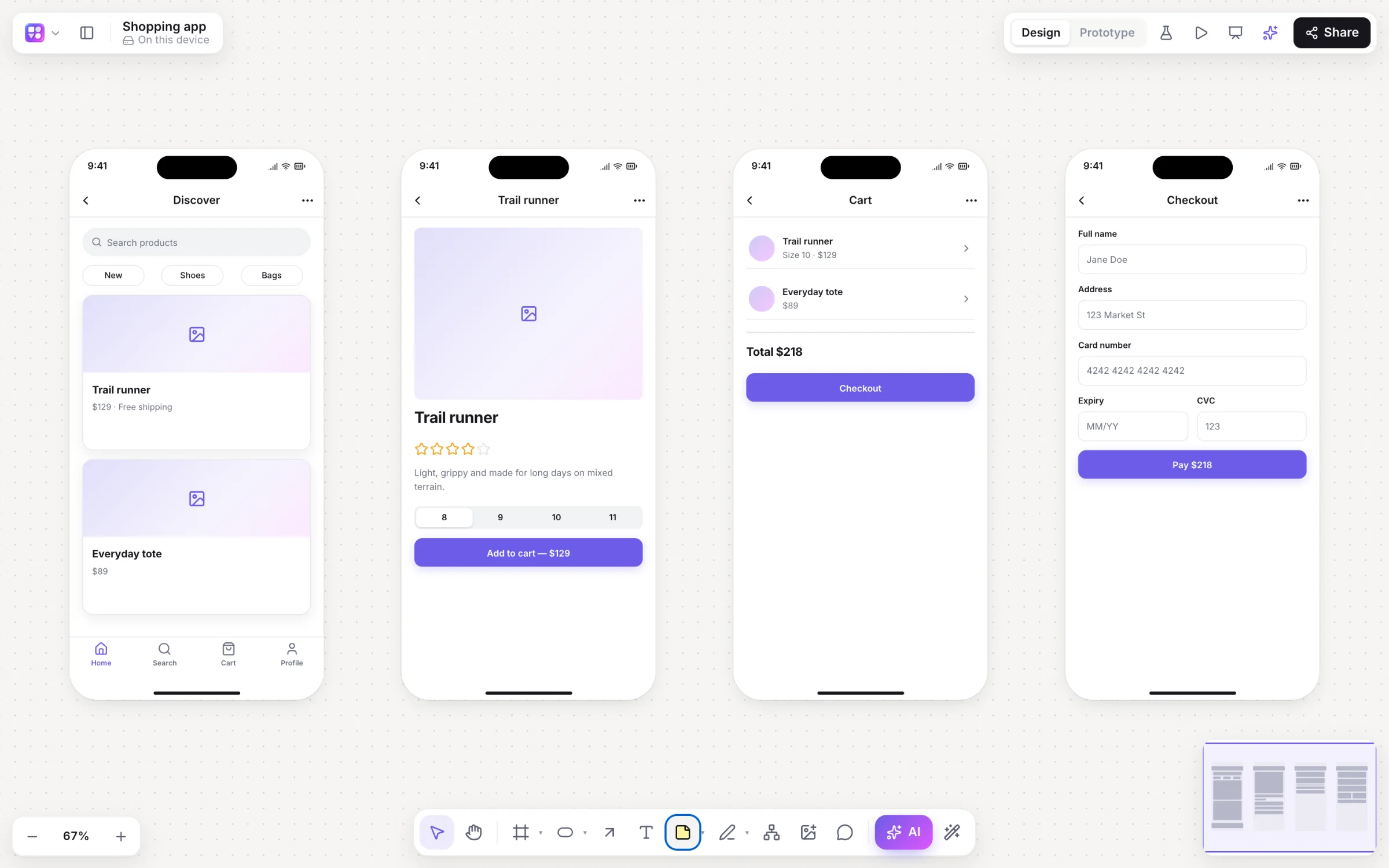
High-fidelity wireframes are detailed: real content, accurate spacing and sizes, brand colours and type, sometimes real images. They’re closer to a mockup and are used once the structure is agreed, for sign-off, handoff and realistic tests.
Most teams start low and raise the fidelity as decisions settle. In Builderii that’s one switch (⇧W) on the same screens, so nothing is redrawn.
Wireframe examples
A website wireframe usually runs top to bottom: navigation, a hero with a headline and a call to action, feature sections, social proof, pricing and a footer. A mobile app wireframe is a set of phone screens, such as onboarding, home, detail and settings, with a tab bar and the main action within thumb reach. A dashboard wireframe places navigation, filters, key numbers, charts and a table. The pictures on this page are a shopping app’s four screens in low and high fidelity.
Make one in minutes
In Builderii, drag components from a 46-piece kit into phone, tablet, web or desktop frames, or describe the app and let the AI wireframe generator draw linked screens. Then link them, press Play, and test them with real people. Step by step: how to make a wireframe.
On the canvas
Real boards, made in Builderii.
Questions
Good questions.
What is a wireframe in simple terms?
A rough drawing of a screen or page that shows where things go (menus, headings, buttons, images and text) without the final look. It’s the blueprint you agree on before designing and building.
What is the difference between low and high fidelity wireframes?
Low-fidelity wireframes are quick, rough sketches of layout and flow. High-fidelity wireframes are detailed and close to the final product, with real content, spacing and brand styling.
Is a wireframe the same as a mockup?
No. A wireframe shows structure; a mockup shows the visual design. See wireframe vs mockup vs prototype.
What tools are used for wireframing?
Paper and pen for the first minutes, then a wireframing tool such as Builderii, Balsamiq, Whimsical or Figma. Builderii adds AI screens from a prompt, one-switch fidelity and clickable prototypes.
Can I make a wireframe for free?
Yes, to start. Builderii’s Free plan has every feature and 200 AI jobs a month per person, for up to 2 boards with up to 50 components on each. Pro takes those limits off for $10 a month billed yearly, or $12 month to month.
Keep reading
More ways to use Builderii.

What do you want to build?
Start with a prompt, a template or a blank board. It’s free to start.